Conferences for Women, Registration Rebuild

Walkthrough for internal review · June 25, 2026
Section 1

What peer conferences actually do

I reviewed peer/competitor conferences against our current structure: INBOUND (UNBOUND), Web Summit, SaaStr Annual, Dreamforce, Create & Cultivate, and Lesbians Who Tech Summit. The goal: understand the structural patterns and form sequences large professional conferences are actually using right now.

Two structural patterns exist

Pattern A Two pages

Sell content on the conference site. Click "Register" → separate registration page or platform. This is how CFW works today.

Used by 7 of 7 conferences we reviewed (including us).

Pattern B Single page

Sell content scrolls down into the registration form on the same page. No handoff at all.

Used by 0 of 7 at scale. Closest is C&C's Squarespace lightbox modal.

Key finding

Pattern A is industry standard for conferences at CFW's scale. But the quality of the handoff varies enormously. Web Summit hands off to a polished register.websummit.com portal with persistent branding. UNBOUND keeps everything on unbound.hubspot.com. Create & Cultivate stays on createcultivate.com throughout via Squarespace cart.

Where we sit: when a user goes from our regional page to the register page, that matches Pattern A, but the handoff lands on a different subdomain (register.conferencesforwomen.org), there's no nav to go back, and because it's an ASPX site, the visual continuity breaks. That's the specific gap to close.

Peer breakdown

Conference Pattern First form field Names collected before payment?
Conferences for Women (today) A · ASPX subdomain Email No, post-purchase only
INBOUND / UNBOUND A · HubSpot subdomain Ticket selection Yes, name, title, company before payment
Web Summit A · register portal Ticket selection Yes, full info before Stripe payment
SaaStr Annual A · separate checkout Ticket type Yes (inferred)
Dreamforce A · reg.salesforce.com Trailblazer account (email) Yes, Trailblazer profile
Create & Cultivate A · Squarespace cart Ticket selection Yes, email + name in cart
Lesbians Who Tech A · page-embedded Likely email Not determinable

Visual reference, peer sell & registration pages

These screenshots show how peers handle the transition from sell content to registration. Note the visual continuity (or lack of it) at the handoff.
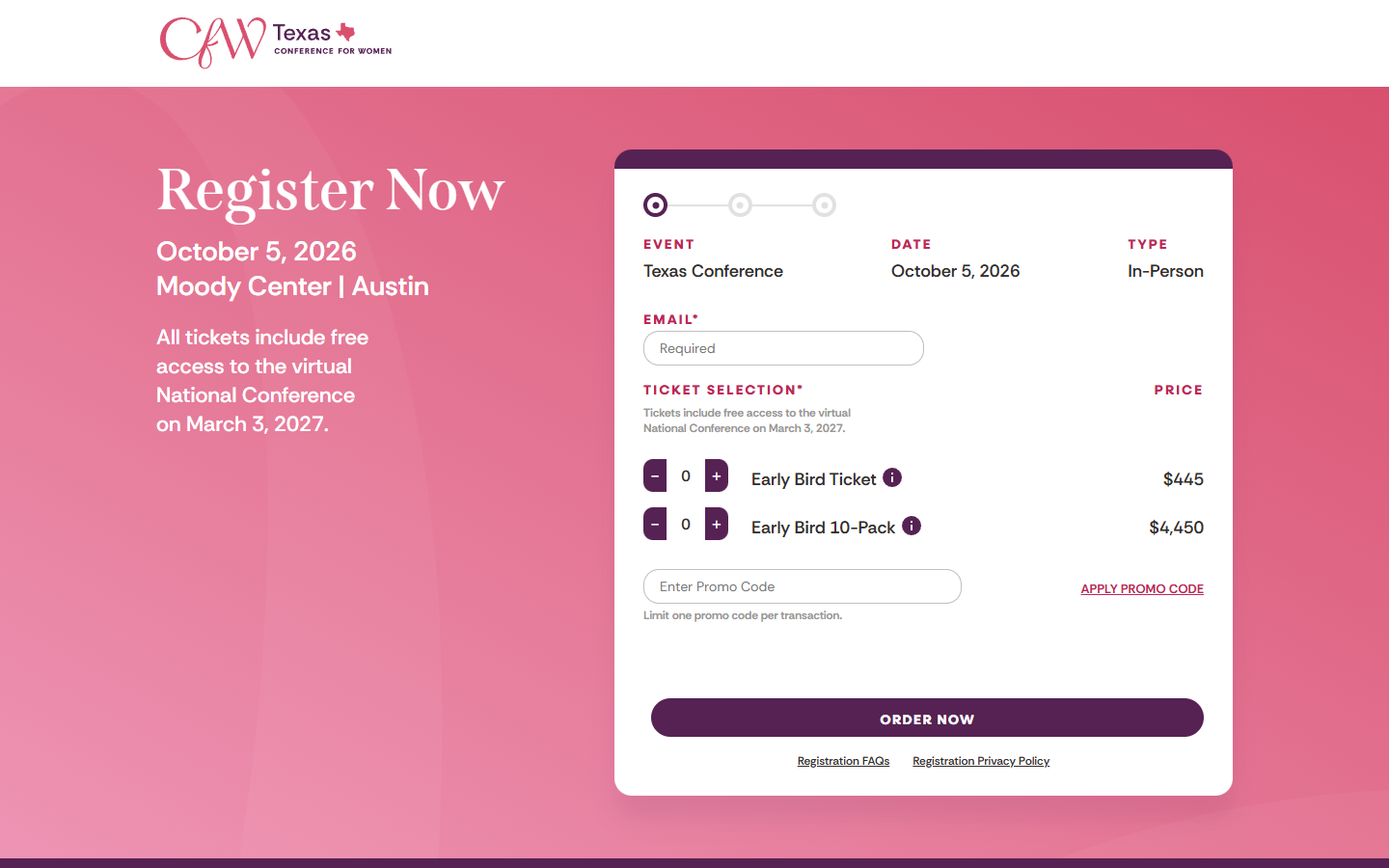
CFW TX ASPX registration form
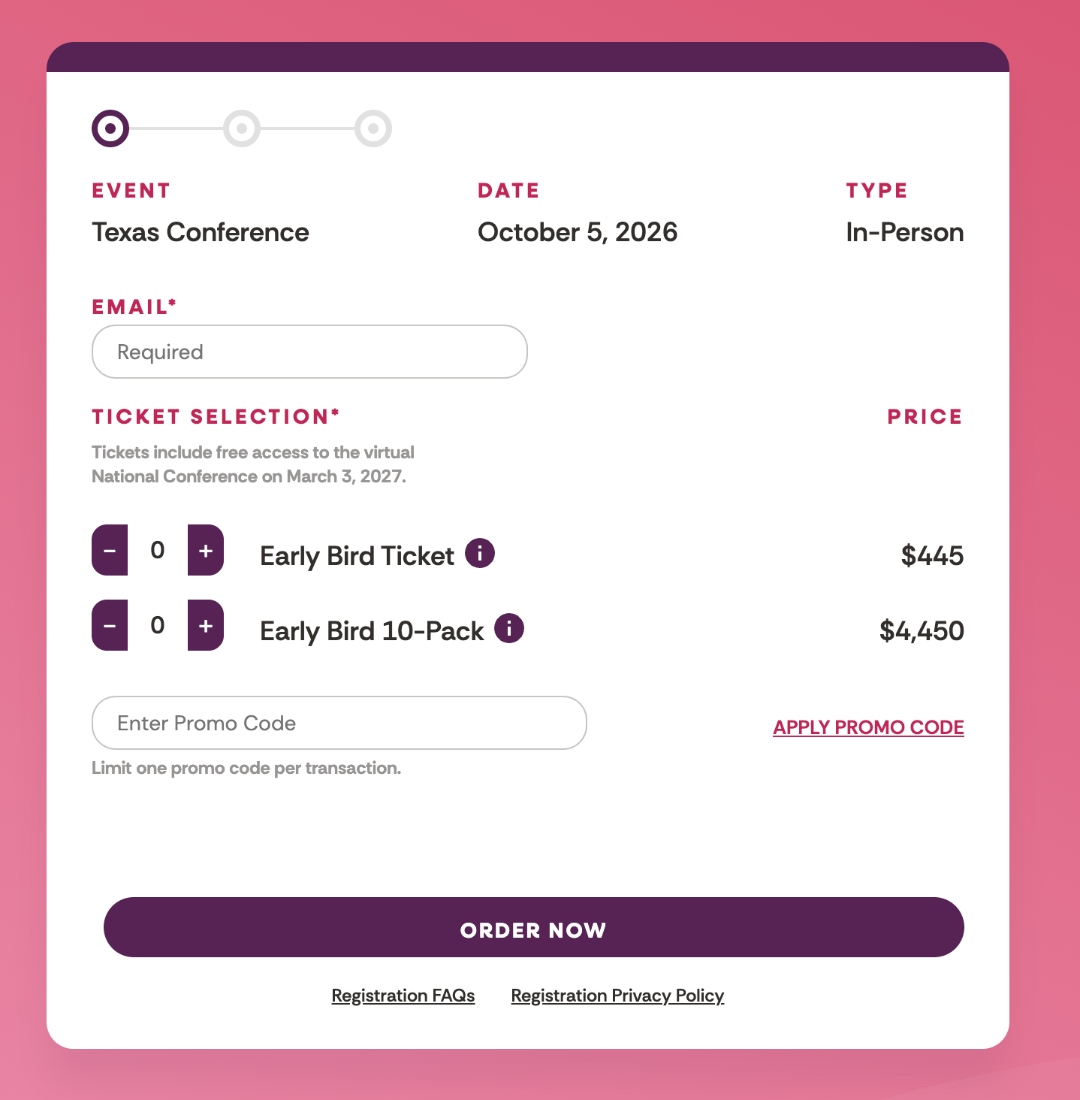
CFW Texas (today), register.conferencesforwomen.org · The current ASPX form on a separate subdomain. Email-first, ticket selector with quantity steppers, promo code. No nav back to the sell page. This is the experience we're replacing.
Create & Cultivate ticket page
Create & Cultivate Festival, createcultivate.com/festival-tickets · Pattern A done well. Same domain throughout. Ticket-tier-first selection (GA / VIP / Golden / Student / Investor). Squarespace cart handles the actual purchase. No brand break.
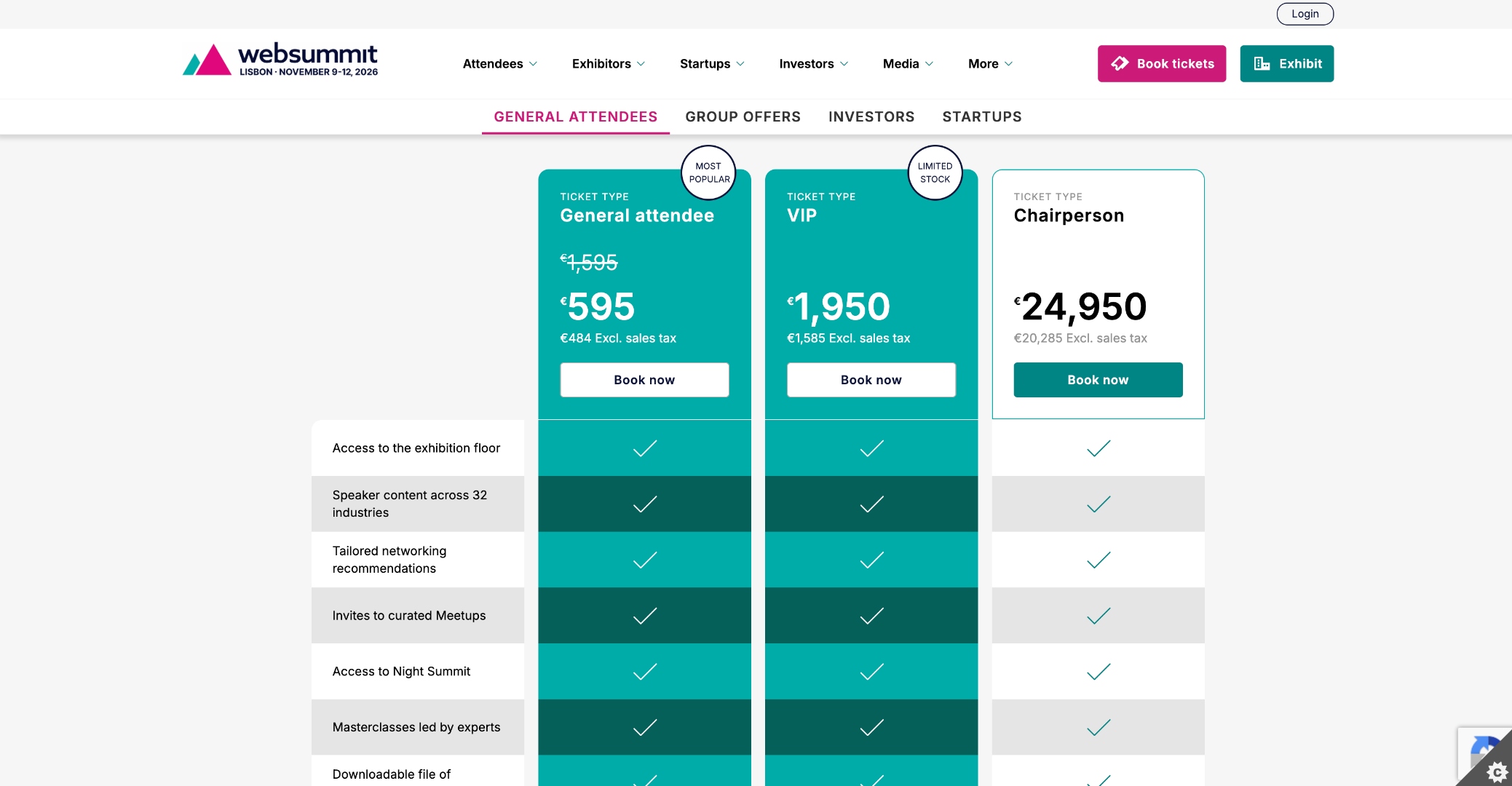
Web Summit tickets page
Web Summit, websummit.com/tickets · Three-tier price anchoring (€595 / €1,950 / €24,950). "Most popular" and "Limited stock" labels create urgency. Group offers shown inline. Click "Book now" → separate register.websummit.com portal.
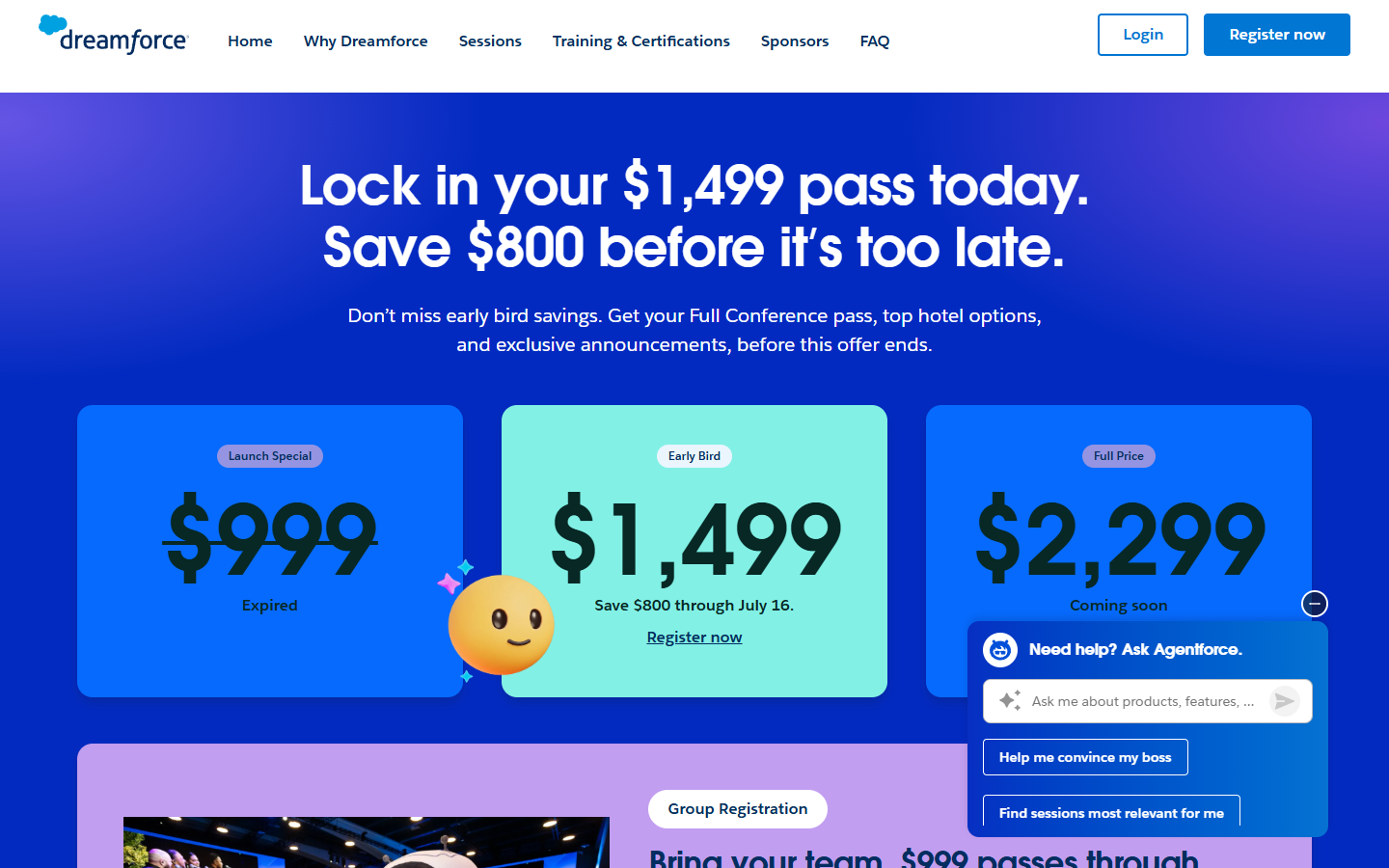
Dreamforce registration
Dreamforce, salesforce.com/dreamforce/register · Three-tier pricing with an active "Early Bird $1,499" countdown. The expired tier ($999) is shown struck-through to make the current price feel like a deal, textbook price anchoring.
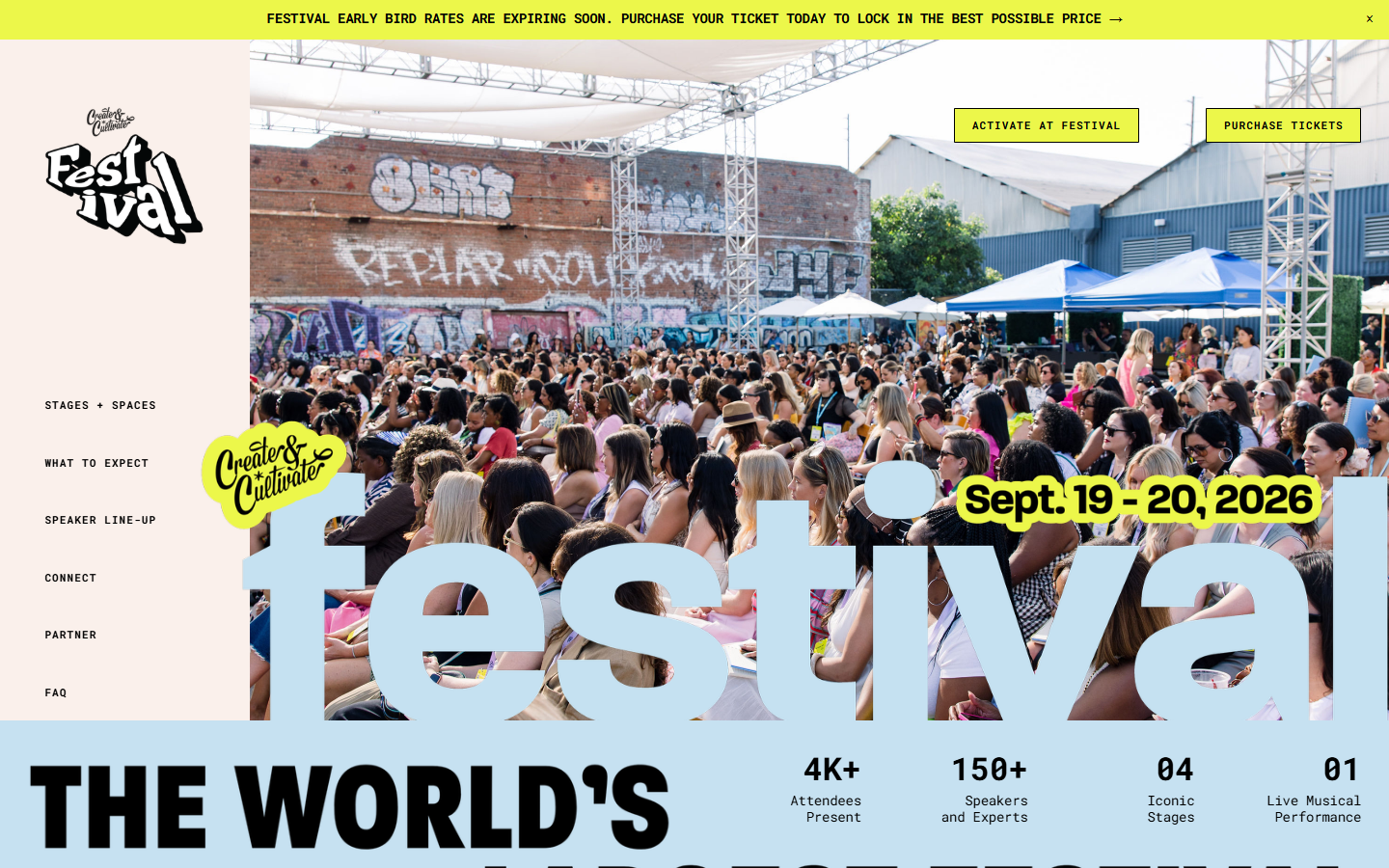
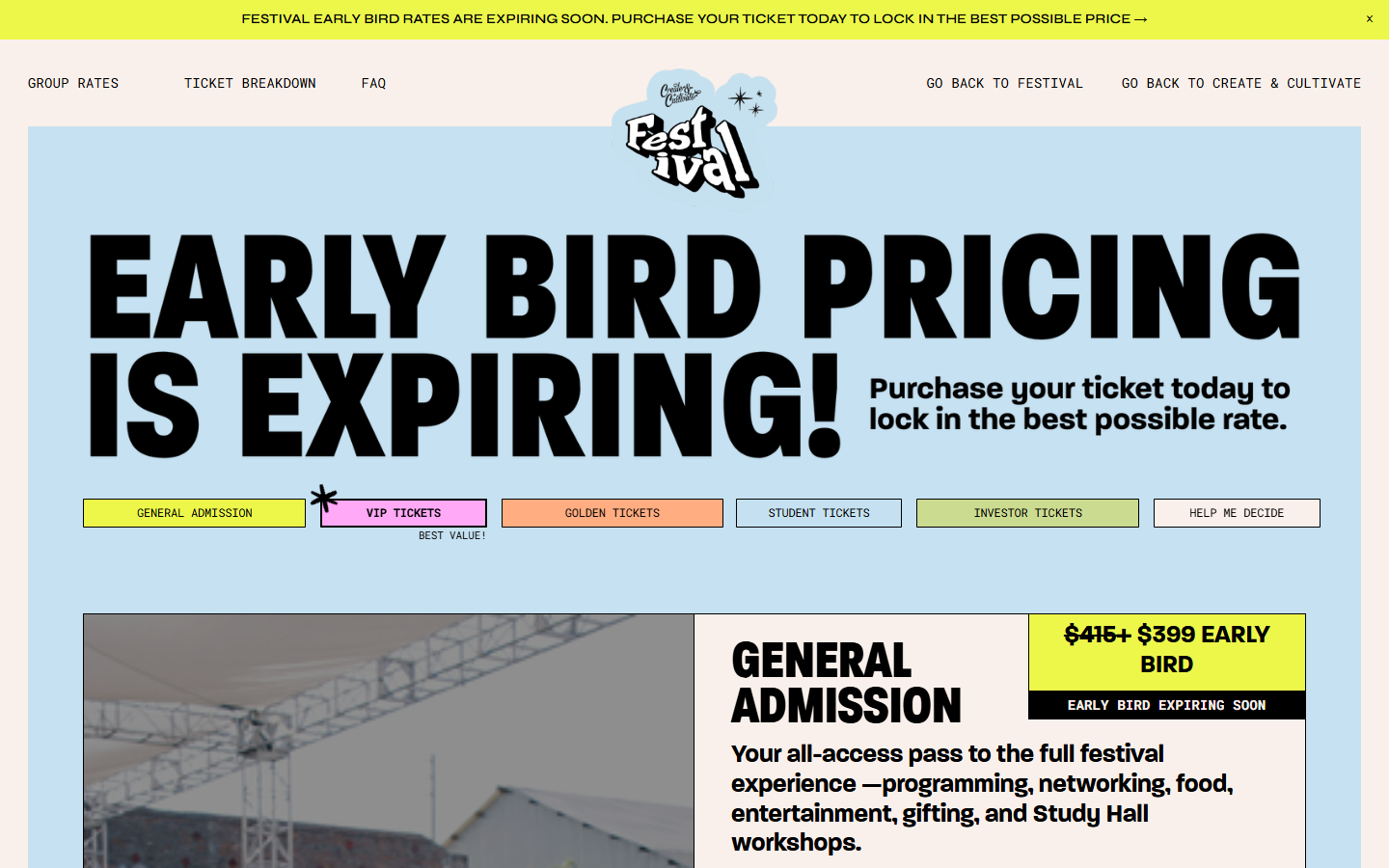
Create & Cultivate festival sell page
Create & Cultivate, createcultivate.com/festival · The sell page with a sticky "FESTIVAL EARLY BIRD RATES ARE EXPIRING SOON" announcement bar. Multiple "Purchase Tickets" CTAs throughout the page trigger a lightbox modal, the closest peer to a single-page pattern.
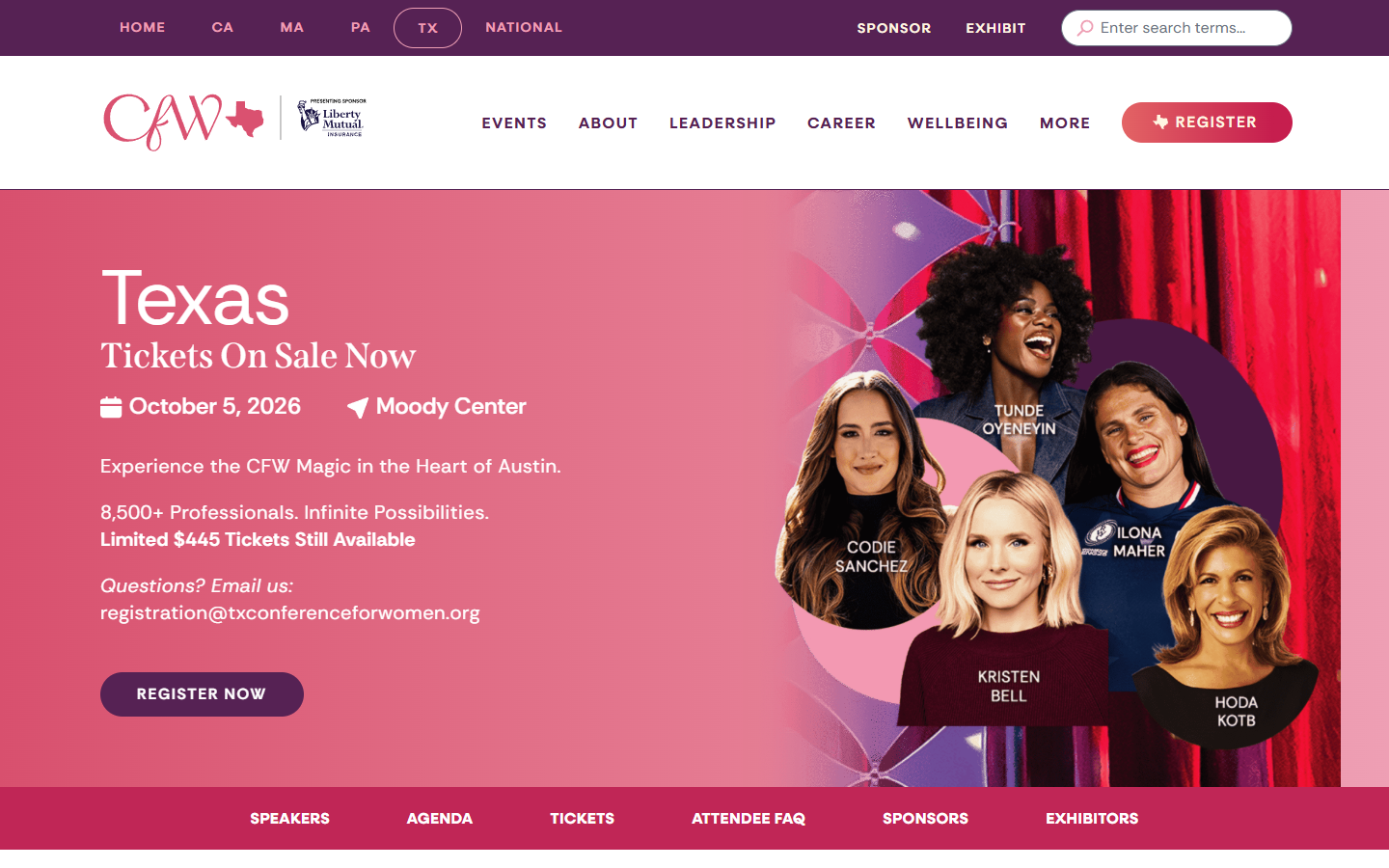
CFW TX sell page
CFW Texas sell page (today), txconferenceforwomen.org · The bones are good: strong hero, confirmed speakers, $445 ticket CTA. This is the page we are redesigning for conversion (new hero treatment, restructured sections, comparison grid), and then fixing what happens after the user clicks "Register Now."

The form field sequence finding

Comparing form sequences across peers reveals two patterns that diverge from CFW's current "Email → Cart → Names post-purchase" flow:

  • Ticket-first is more common than email-first at directly comparable conferences (UNBOUND, Web Summit, Create & Cultivate). Picking a ticket is lower commitment than typing an email.
  • Every comparable peer collects attendee names before payment. CFW's post-purchase name collection is the clearest outlier in the peer set.
Section 2

How registration works today

The current flow: user starts on the regional WordPress site, then hands off to a separate ASPX subdomain to register and pay.

1 User lands on txconferenceforwomen.org WordPress

Regional sell page with speakers, agenda, ticket info.

↓ Clicks "Register Now"
2 Cross-subdomain jump to register.conferencesforwomen.org ASP.NET (legacy)

Different domain. No persistent nav. SSL error on root URL. Visual break from main brand.

3 Step 1 of 3: Email → Ticket select → Promo code ASPX form
4 Step 2 of 3: Contact info (buyer only)
5 Step 3 of 3: Payment
↓ After purchase, separate email/link
6 Attendee names collected post-purchase

Buyer receives a follow-up to enter the names of each attendee. Operational burden + buyers feel disconnected from their attendees.

Screenshots of the current flow

The three steps of the live ASPX registration today.

Current Step 1: email and ticket selection
Step 1, today. Email is required up top before the user can pick a ticket. Quantity steppers default to 0. Promo code field sits below. "Order Now" is the only way out.
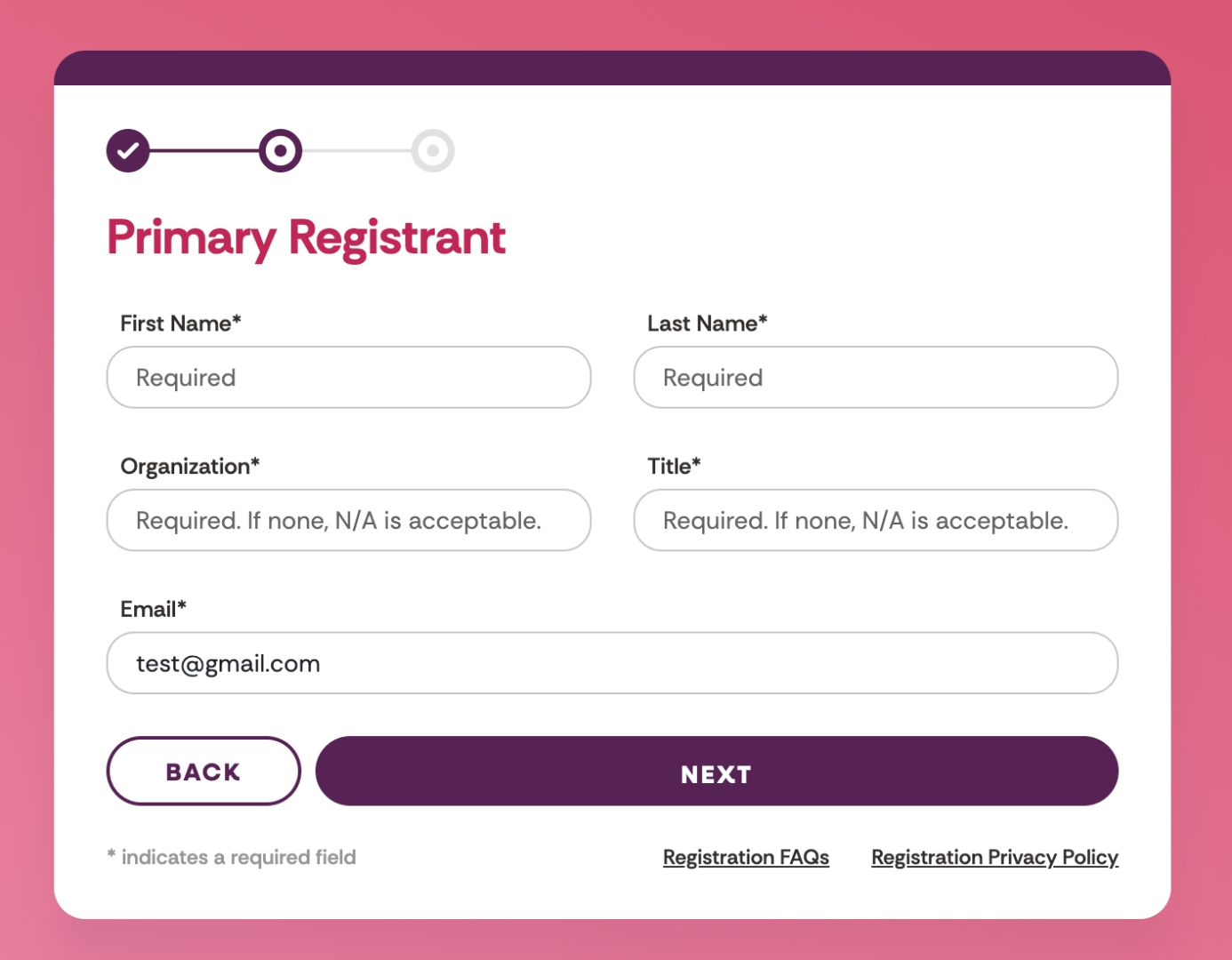
Current Step 2: primary registrant
Step 2, today. Primary registrant only. First Name, Last Name, Organization, Title, Email. No attendee names captured here, even if the buyer purchased multiple tickets.
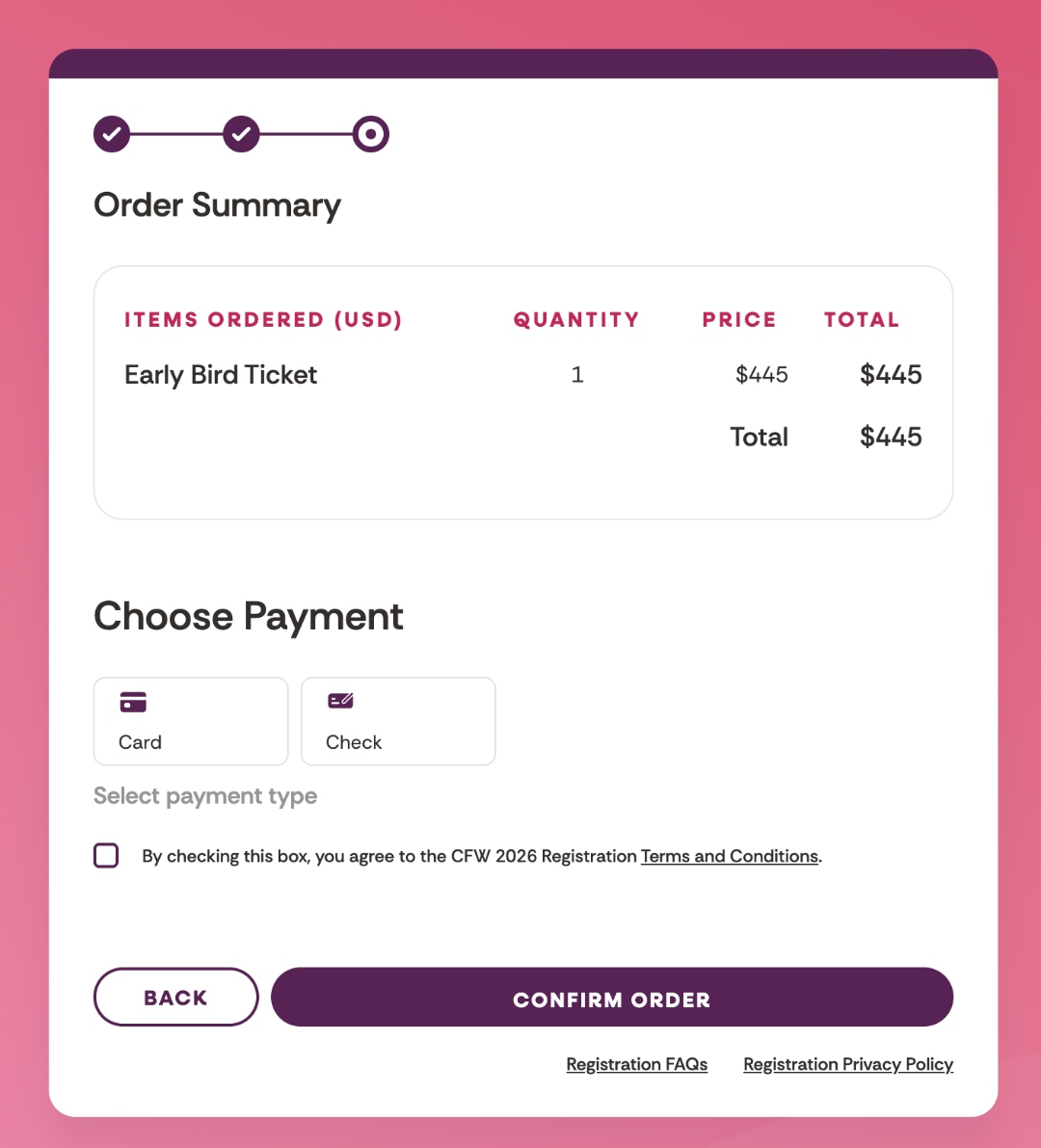
Current Step 3: order summary and payment
Step 3, today. Order summary plus Card or Check selection. After confirming, the buyer is sent a separate email to enter the names of their attendees, which is where ops and follow-up burden lives today.

What breaks here

  • Cross-subdomain jump kills brand continuity and creates ad-traffic crashes (in-app browsers struggle with the handoff)
  • ASPX form aesthetic doesn't match the WordPress site, looks like a different company
  • Credit cards declining on the live site (confirmed in testing), payment infrastructure isn't reliable
  • Post-purchase name collection creates a second round of support load and reduces buyer commitment
  • No persistent navigation back to the sell page, once they jump, they're stuck
Section 3

The proposed structure

Pattern A, two pages, but with a same-domain, same-brand handoff. The registration page lives on WordPress at txconferenceforwomen.org/register with an embedded HubSpot form handling the entire transaction.

Page 1: The regional sell page

Restructured for conversion. Each section has a purpose. Multiple "Register" CTAs throughout, every one of them leads to Page 2.

Sticky nav (matches current CFW site)
[CFW Logo] · Events · About · Leadership · [Register Now] (always visible)
Hero, speaker carousel
Experience the CFW Magic in the Heart of Austin
Oct 5, 2026 · Moody Center · 8,500+ Professionals

Background: rotating carousel of speaker photos (Hoda, Kristen Bell, Ilona Maher, Codie Sanchez, Tunde, Michelle Khare…), replaces the current static "cheap" hero.

[Primary CTA: Reserve Your Seat, From $445] [See the Lineup ↓]
Social proof bar
"Trusted by 9,000+ professionals from companies including:" [logo] [logo] [logo] [logo] [logo]
Keynote speakers (the selling tool)
Photo grid: Hoda Kotb · Kristen Bell · Ilona Maher · Codie Sanchez · Tunde Oyeneyin · Michelle Khare · + see full lineup
What's included
6 perk cards: Reserved arena seating · CareerWorks 1:1 · Concourse Collection · Networking · Boxed lunch · Free virtual National access
A day at the conference
Agenda timeline: 7:00 doors · 8:30 Career Power Talks · 9:40 Keynote 1 · 11:20 Leadership · 12:20 lunch · 1:05 Wellbeing · 2:15 Keynote 2 · 3:00 DJ Dance Party
Testimonials
3 past-attendee quotes with name, title, company
Ticket tiers (price anchoring + comparison grid)
[Early Bird $445 · Limited] [Standard $495] [10-Pack $4,450], each card links to /register with that tier pre-selected.

WordPress lets us build a feature-by-feature comparison grid below the cards (reserved seating · CareerWorks 1:1 · Concourse access · networking · lunch · virtual National), same pattern as Web Summit and Create & Cultivate.
FAQ accordion
Refund policy · Group registration · Dietary · Accessibility · Virtual access · Transfers · Parking
[Reserve Your Seat, Oct 5, 2026]
Footer
Contact · Sponsors · Social · Privacy

Page 2: The registration page (new)

Lives on WordPress at txconferenceforwomen.org/register, same domain, same brand, same nav. The form itself is an embedded HubSpot form that handles ticket selection, attendee info, names, and Stripe payment.

Same sticky nav as page 1
[CFW Logo] · Events · About · Leadership · Register (active)
Compact event context strip
Oct 5, 2026 · Moody Center · 8,500+ Professionals
What's included per ticket (above the form)
Early Bird $445 / Standard $495: reserved arena seating · CareerWorks 1:1 · Concourse Collection access · networking sessions · boxed lunch · free virtual National access.

10-Pack $4,450 / $4,950: all of the above for 10 attendees · group seating block · single-invoice billing · dedicated group contact.

So the buyer sees exactly what they're getting before the form asks for anything.
HubSpot form embed (4-step)
━━ Step 1 of 4 ━━
Ticket: ◉ Early Bird $445 ○ Standard $495 ○ 10-Pack $4,450
Quantity: [ 1 ▾ ] Promo code: [ _____ ] Total: $445

━━ Step 2 of 4 ━━
Email · First name · Last name · Company · Title · Phone (optional)

━━ Step 3 of 4 ━━ (for 2+ tickets)
Attendee names inline, OR "I will add attendees later" (HubSpot sends an automated reminder)

━━ Step 4 of 4 ━━
Order summary · Stripe credit card · [Complete Registration]
Powered by Stripe · Secure payment
Trust strip below form
"Secure payment · Tickets transferable · Free virtual National included"
Footer
Same as page 1

What this fixes

  • Same domain handoff, no ASPX subdomain jump, no SSL error, no brand break
  • Persistent navigation, user can go back to the sell page without losing their place
  • HubSpot owns the form, your HubSpot admin can configure fields, automations, confirmation emails directly
  • Stripe handles payment, modern, reliable, works in FB/IG in-app browsers
  • Names collected when known, deferred when not: individual buyers fill names inline; 10-pack buyers can choose "I will add attendees later" and get an automated reminder via HubSpot (because companies often do not know attendees until close to the event)
Section 4

Form field sequence: current vs. proposed

The clearest change is what the form asks for, and when. The current sequence is unusual relative to comparable peer events. The proposed sequence aligns with what UNBOUND, Web Summit, and Create & Cultivate actually do, while keeping the abandonment recovery that leadership has asked for.

Current sequence

Step 1
  1. Email (required)
  2. Ticket type + quantity
  3. Promo code
  4. → ORDER NOW
Step 2
  1. Buyer contact info
Step 3
  1. Payment
After purchase
  1. Attendee names (separate email link)

Proposed sequence , ticket-first, validated by peers

Step 1: Ticket selection
  1. Ticket type (Early Bird / Standard / 10-Pack)
  2. Quantity
  3. Promo code
  4. Running total displayed
Step 2: Your information
  1. Email (with "Already registered? Log in" link)
  2. First name
  3. Last name
  4. Company
  5. Title
  6. Phone (optional)
Step 3: Attendee names (for 2+ tickets)
  1. Inline name entry per attendee
  2. "Add later" option for 10-packs with deadline reminder
Step 4: Review & payment
  1. Order summary
  2. Credit card (Stripe inline)
  3. Pay by check (secondary option, optional to keep)

How we still recover abandoners without email-first

The reason we added email was in case people put a ticket in the cart and dropped off, so we had a way to chase them down.

What changes: Email, name, and company move to Step 2, which is still before payment. That is also how UNBOUND, Web Summit, and Create & Cultivate do it.

How we re-engage them if they leave at Step 2 or later:

  • HubSpot abandoned-form workflow: the second email is entered at Step 2, the contact lands in HubSpot. If they do not finish, an automated sequence fires (24h reminder, 72h incentive, 7-day final). We cannot do this today because the ASPX form does not write into HubSpot in real time.
  • Step-level tracking: HubSpot tells us exactly which step they dropped on, so leadership gets a real view of where the funnel is leaking instead of guessing.
  • Meta + Google retargeting pixels: fire on the /register page load, so ad audiences keep building even from people who never enter a single field.

Net effect: we go from "capture email up front and hope" to "capture email at the point of commitment and run a real automated chase."

Why these specific changes

ChangeWhyEvidence
Ticket selection moved to first interaction Lower cognitive load than typing email; user "commits" to a tier before being asked for data Validated by UNBOUND ($1,399), Web Summit (€595+), Create & Cultivate ($399)
Email moved to Step 2 (still captured before payment) Still captures lead before payment for abandonment recovery, but doesn't gate the first interaction Compromise between CFW's current email-first and peer ticket-first patterns
Attendee names captured inline when known, deferred when not For solo buyers, names inline. For 10-pack buyers (who often do not know attendees yet), an explicit "add later" path with an automated HubSpot reminder, instead of today's silent, manual follow-up. Solves both: peers capture names before payment when buyers know them; CFW's reality is that companies buying 10-packs frequently do not.
Add Company + Title fields Enables better sponsor ROI reporting and attendee segmentation in HubSpot Standard across UNBOUND, Web Summit, Dreamforce
Section 5

How HubSpot + Stripe + WordPress connect

The flow is straightforward, and every component is talking to one platform the team already knows.

The data flow

1 User clicks "Register" on the WordPress sell page WordPress

Navigates to txconferenceforwomen.org/register, same domain, no redirect.

2 WordPress page loads with embedded HubSpot form WordPress + HubSpot embed

The HubSpot WordPress plugin (or a manual embed code) renders the form inline. Looks native to the page.

3 User fills Steps 1–3 (ticket, info, attendee names) HubSpot form

Data writes to HubSpot in real time. Email captured at Step 2 enables abandonment recovery via HubSpot workflows.

4 Step 4: Stripe payment processed HubSpot Payments (Stripe)

HubSpot Payments uses Stripe under the hood. Card details never touch our server. PCI compliance handled by Stripe.

5 Contact created/updated in HubSpot with all registration data HubSpot CRM

Custom properties: ticket_type, ticket_quantity, conference_year, company, title, attendee_names, amount_paid, payment_date, etc.

6 HubSpot workflow triggers confirmation email + adds to event list HubSpot workflows

Standard confirmation. Adds to pre-event nurture sequence. Adds to list for Day-Of comms.

What we need from whom

OwnerResponsibility
WorkhorseWordPress admin work: install HubSpot WP plugin · Create the new /register page · Update sell page CTAs to point to /register · Set up 301 redirects from the old ASPX URLs
Sam (HubSpot)Build the HubSpot form (4 steps, fields, validation) · Map fields to custom contact properties · Build confirmation email + nurture workflow
Sam (Stripe / Finance)Configure HubSpot Payments + connect Stripe · Confirm live keys · Test transactions in live mode before launch
Rachel (Design)Style the HubSpot form to match CFW brand · Direct the new sell page sections (speaker carousel hero, ticket cards, comparison grid)
Rachel (Marketing)Write all page copy · Update paid ad destination URLs to new /register page · Set up GA4 + Meta Pixel purchase tracking

One open dependency

Confirm our HubSpot tier supports HubSpot Payments. Payments are included in Sales Hub Starter+ and Marketing Hub Pro+. If we're below those tiers, the alternative is to use a HubSpot form for data capture + a separate Stripe Checkout link for payment (slightly less seamless but functionally similar).

Section 6

Next steps

If we align on this direction today, here's the proposed sequence to get from where we are to a working new flow.

  1. Confirm HubSpot tier supports HubSpot Payments (today)
  2. Workhorse: WordPress admin work, create /register page shell, install HubSpot WP plugin, wire CTAs and 301s
  3. Sam: Build the 4-step HubSpot form, connect Stripe via HubSpot Payments, set up confirmation + nurture workflows
  4. Rachel (Design): Style the HubSpot form to brand, direct new sell page sections including the speaker carousel hero
  5. Rachel (Marketing): Write all page copy, prep Meta Pixel + GA4 tracking spec
  6. QA: Test on desktop, iOS Safari, Android Chrome, and critically the Facebook + Instagram in-app browsers
  7. Cutover: Update all paid ad destination URLs, 301 redirect old ASPX URLs, sunset the legacy form

What we're solving for

  • Stop the in-app browser crashes from FB/IG ad traffic
  • Fix the credit card decline issues on legitimate cards
  • Eliminate the cross-domain handoff that breaks brand and trust
  • Move attendee management from post-purchase to inline
  • Get registration data flowing directly into HubSpot for cleaner ops